Interview with Steve Ponton: LinkedIn for business development.
31 January 2021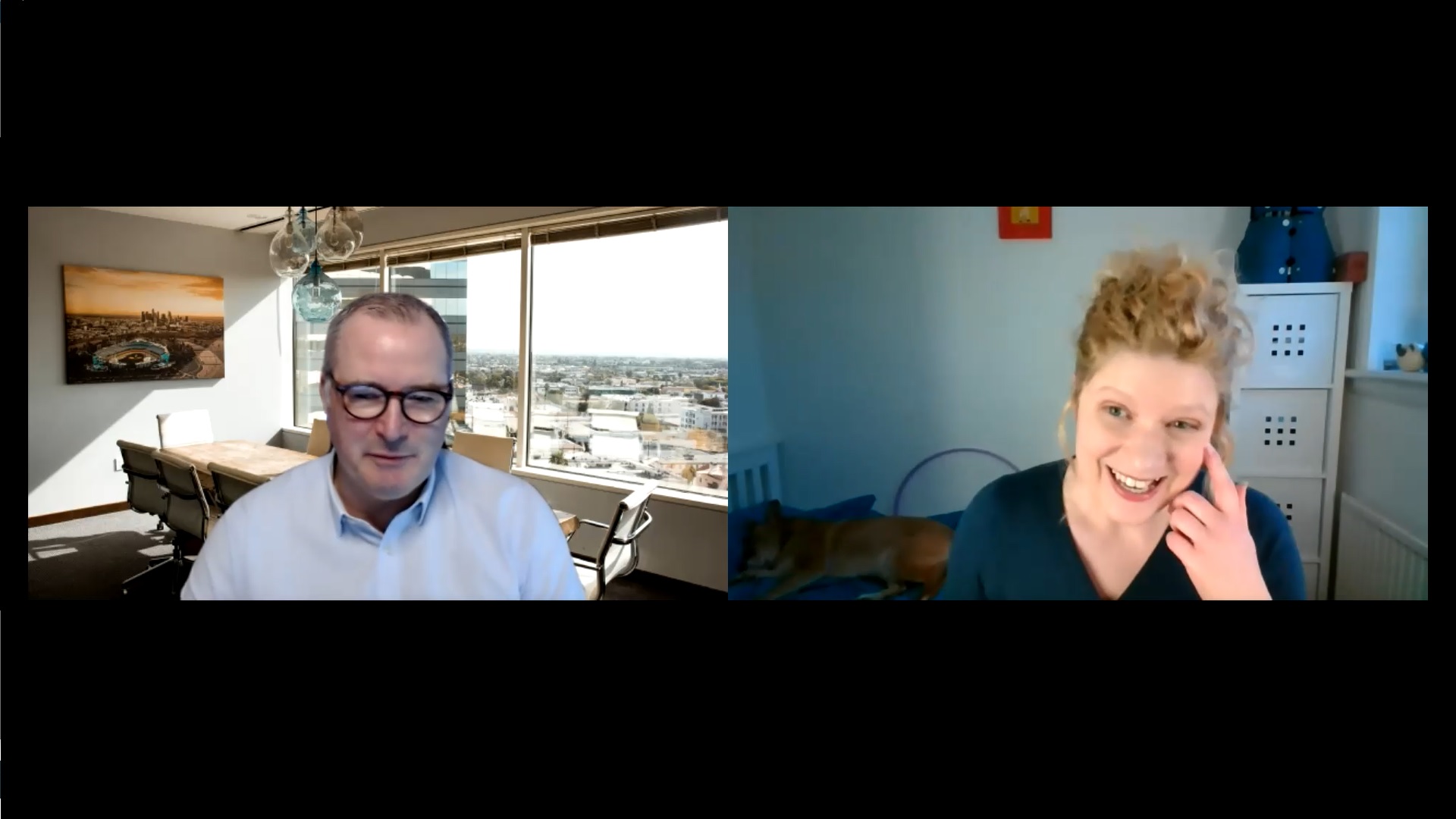
LinkedIn is a powerful tool, both for marketing communications and business development. In the first in my series of interviews with experts in specific fields of marketing and fields related to marketing, I spoke to Steve Ponton of LinkedIn Success Systems. Steve is an expert on LinkedIn, with a focus on the business development side.
We mostly spoke about getting your profile right, what to do, and what not to do – with the real-life examples of Steve’s profile (best practice) and my profile (not so much). Watch to find out more – or read the transcript below if you prefer.
Steve’s links:
LinkedIn profile
Free LinkedIn webinars
Funding for LinkedIn training course
Transcript:
Samantha: I'm Samantha Tonge from Labrakita Marketing, and this is the first in my series of interviews with specialists within specific areas within marketing or related to marketing. And today I'm here with Steve Ponton, who is a LinkedIn expert.
So, Steve, you've been active on LinkedIn since really early doors - one year after it was launched in 2004?
Steve: Yeah, within 12 months Samantha. Thank you for bringing me on to the call it's great to be speaking to you. And, in fact it's great to be speaking to anybody at the moment!
Samantha: I was going to say, you've got a couple of years on me, I thought I was early doors. And you've spent the last six years developing your expertise in order to teach others with, is it Miles Duncan?
Steve: I'm an associate partner of LinkedIn Success Systems, and Miles Duncan is the founder and Chief Executive Officer. Way back in the stone age in 2004 I joined LinkedIn. It was founded in, 2003 so within 12 months of being founded I was I on there, and I seem to recall, at one point, you got some kind of gong or accolade or whatever, they said I'm pretty sure that I was in the first 500,000 subscribers.
Samantha: Oh wow!
Steve: When you consider they have 722 million subscribers today, it's a reasonable achievement I think isn't it? When it first came along and I became aware of it, I thought it was a really, really useful thing to be involved in back then when social media was really not that prevalent.
My thought about it was that if I can connect with people, digitally it's much easier than spending time visiting people face to face etc. My background had been in sales and business development from the early 90s at a time when mobile phones didn't exist, essentially, email was in it's infancy, sales calls had to be done in advance in your diary, you had to put it in the diary and then you would physically drive to a client's premises. And if they will off sick or weren't available then you could either sit in reception for a long time or perhaps try and pick up on other people. So, LinkedIn seemed like a fantastic concept way back in 2004, in terms of growing my network and of course using it as a CV.
Samantha: It's a great starting point as well, I found, when it's time to do your CV: download it and then you can start getting a good CV together.
Steve: Absolutely. And I think that's one of the features that a lot of people forget exists. You download the PDF, and then you can make changes so, lots of features within LinkedIn that are really, really useful and people often forget what's there.
Samantha: So, obviously, my focus (because I'm a marketing consultant) with LinkedIn is very much the marketing communication side, and there's a huge overlap, but it's also a really powerful tool in business development: which is really your focus isn't it?
Steve: Yeah, absolutely. So, our methodology is to initially take people off LinkedIn, we ask that you can shut LinkedIn down, and then we ask you to focus on clarifying your brand for LinkedIn. And that essentially gives you the tools to consider who you really want to target on LinkedIn. So; what type of companies and the individual role in the company. Because LinkedIn allows you to do that. It's not like in a previous life where the receptionist or somebody's PA were the gatekeepers. If people are on LinkedIn, then it's open season, and they've got the choice then whether they want to connect with you or not. So, our methodology is really about sales and business development using those 722 million registered users on LinkedIn.
Samantha: Brilliant. Okay, so I'll start with some questions. What do you think are the three biggest mistakes that most of us make on LinkedIn?
Steve: I don't think we've got long enough on this particular call to go through them in great detail, but a lot of the stuff is really, really, fundamental, simple and can be easily fixed.
One that I come across quite often because LinkedIn will regularly suggest to you some connections based on the algorithm. Now, please don't get tied up in the algorithm, it is what it is, there's nothing you can do about it, but if you are mindful of it, and you do some of the stuff that we teach in our methodology, then the algorithm will take care of itself. But essentially, LinkedIn offers you up clients, it offers you up people that the algorithm has identified you may be interested in connecting with. And something that I've seen recently quite often because more and more people have joined LinkedIn, because of the pandemic situation, and working at home, is there's that they have put together this wonderful profile that includes lots of information about what they do and how they can help people. And then there's this big grey socker where their photograph should be.
Now that's a dead simple thing to fix, it's in your settings, but if you haven't set up correctly then anybody that's not a first-degree connection won't get to see your wonderful, wonderful, image. So, quite often, if LinkedIn is offering me new connections, and I see the big grey circle in the middle, I know from looking at the profile that they've actually spent time on doing the profile but forgot to add that final click, or they've checked the wrong box that says, "let the whole of LinkedIn see my profile photograph" so that's one of the common failures at the moment.
Another one is really common, and I've seen it from Chief Executives of companies to sales directors, to HR directors. They've spent a bit of time on adding the new business, or a business that they've joined perhaps, or being headhunted to or whatever, and then in their contact information, there's a website for a business that they were involved in previously, I've seen examples where people who have changed jobs in the last four or five years, have still got a link in their contact information to a previous business, who may be, and often is, now the competitor. If somebody jumps on your profile and goes to your contact details, and click on the website and it takes them to the competitor, you've lost out, you've lost out big time.
So, whenever you're updating your profile if you've switched jobs, from a different company in particular, please always make sure that you completely update your contact information it's really, really, important. And on top of that it gives you an opportunity to add things like your Twitter account if you want, which people who looking at your contact information can click and join you on Twitter as well. So that's number two in terms of the mistakes at the moment.
I suppose the biggest one for most people in terms of using LinkedIn, not to find a job, but to do business development or sales, is that their profile often reads like a CV. “Look at me, I'm really good. I've got these qualifications for business development, and sales” - nobody cares. All they want to know is how you going to help them. So, we use a pretty simple model which we call the XYZ, I help X to do Y by helping them to do Z, so it guides you to put your particulars on your profile in a way that you're talking more about your clients than you are about yourself so that's really the biggest one. And the whole new tranche of people who have jumped on LinkedIn because of their circumstances are making all the same mistakes that people have done for a number of years. We like to think that once we've helped you to clarify your brand, we then help you to make an optimised profile that talks about your clients and not about you all the time so that's the three areas I would say pay attention to at the moment.
Samantha: And that's, that's all on your profile screen?
Steve: It is, yes, do you want me to share?
Samantha: Yeah, that'll be great, so people know where it is they need to go in and double check their contact details for example.
Steve: Yep. So, if we look at, if we look at my profile in particular. My about section talks about clients. The pain points that they have, you know, you may struggle with time, resources and backup, specialising in three distinctive areas, etc. etc. etc. Now, you know, I've fallen a wee bit foul of not updating my profile, but I'm going to do that in the next couple of weeks.
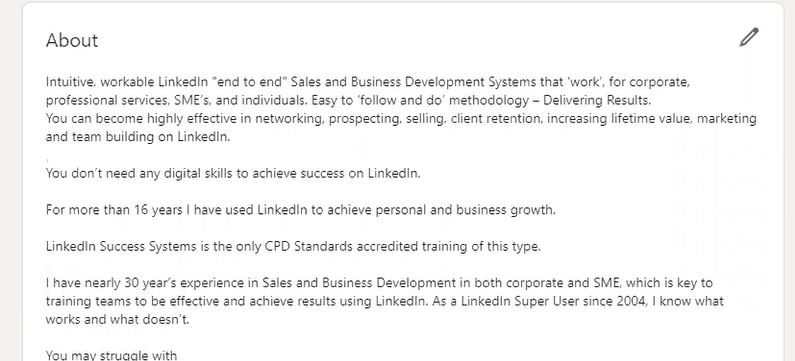
And I've included information on my about section where people can email me or give me a call.
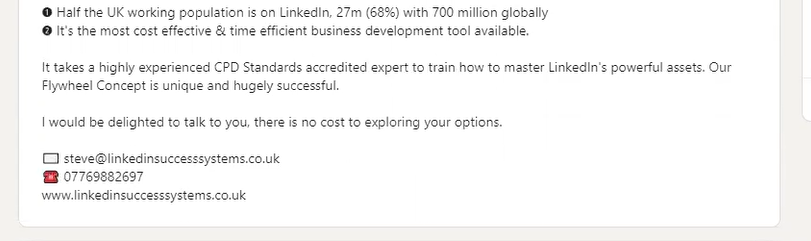
And it's the same with experience, it talks about who we help, how we help those people, and what the outcome for those clients or prospects is likely to be. So, we don't want to see something in here that talks about "me" "me" "me" all the time. You know, "Me, myself and I" type stuff, so that hopefully will give you an idea of what a post-optimised profile should look like.
Samantha: Okay, and the contact information, you talked about putting it in the about section, but it should also be correct when you click on contact info, I'm guessing that's what you were talking about where they had incorrect websites

Steve: Yeah, well, a complete contact info section should look something like this.
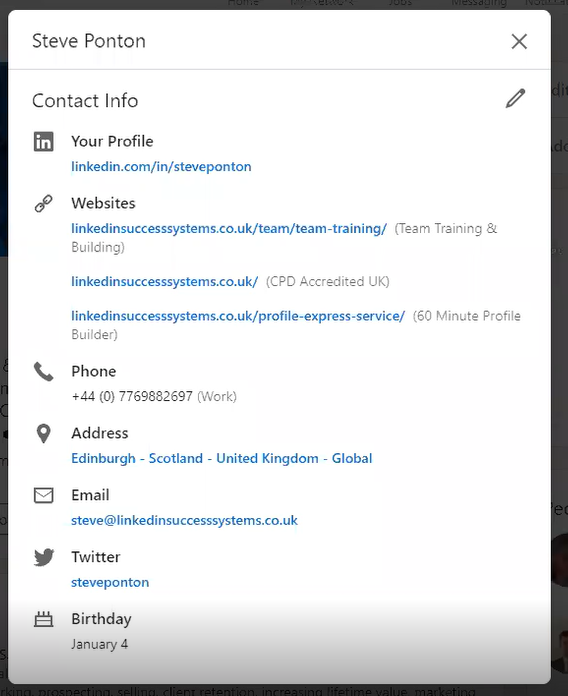
And again, you know, LinkedIn is the gift that keeps on giving. For example, lots of people, perhaps, put their main website, landing page in this section here.
Where LinkedIn have actually given you the opportunity to put three particular parts of your website in there, so it might be, reviews for example, which are very, very powerful, it might be your blog, or it might just be a general overview of what your particular services are.
And they also allow you to select the key words that you want to include on your profile which is useful for SEO effort, and for searching on LinkedIn. So if I go to the next stage and just kind of show you what we do in terms of editing. This drop-down area here, will give you a whole list of options, but it also gives you an option to put in "other", so you can then put in your keywords in this part here.
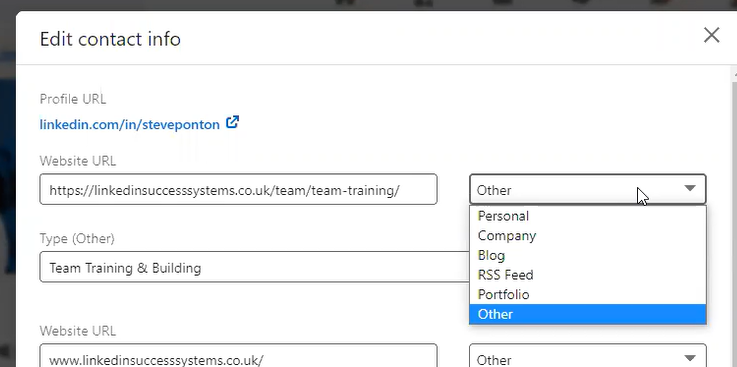
So, you can add up to three websites, as I said that include perhaps your blog or your services or perhaps client reviews for example. Your telephone number should always be a business, telephone number and your email address. Again, profiles are very personal, but we recommend that you in your business email address, rather than a Gmail address or a Yahoo address or whatever, otherwise you're going to get business people emailing you on your personal email.
As I said before, you can pop your Twitter account in there, which also allows you, when you're posting content, to have the option to post it onto LinkedIn, and also to Twitter at the same time. So, I do that, I do that on a regular basis. So, lot of features in there that really just help you get along, that you don't have to really think about once it's set up.
Samantha: OK, Brilliant! And so having talked about the three biggest mistakes people make, what are your three top tips?
Steve: Top Tips tend to change. I'm amazed I got away with saying that: "the top tips tend to change". Three particular things that I would suggest you do but, it may not be relevant to everybody, but one of the top tips that I would certainly say (and lots of people fall foul of).
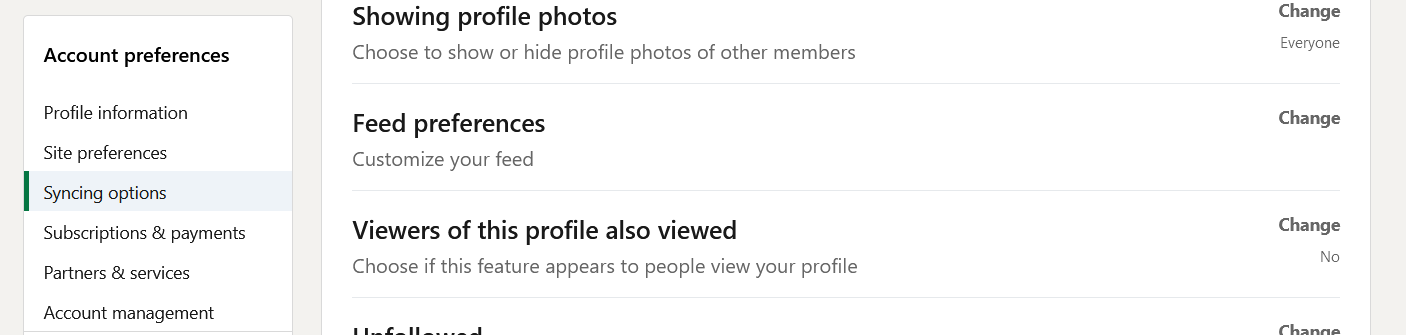
And if you don't mind, we'll use you as an example. So, on the right hand side of the, the, the landing page if you like, is a section called "people also viewed". Okay, so my top tip would be to switch in your settings and privacy, "people also viewed" to "no".
Samantha: Okay, and that's in your settings Yeah?
Steve: Yes. And the reason for suggesting that, and recommending that, is that we talk about in our orientation sessions the "four seconds above the fold", which people yourself in marketing will understand exactly what that is. It's the part where you land on either a website or profile, the amount of time that you have to grab somebody's attention before you start to look in this area, below the fold, essentially. Now that four seconds is probably become much less than that these days. This was probably a couple of years ago. So, if I, if I'm looking for somebody that has your expertise and I land on your profile page within seconds I will made up my mind whether you're somebody that I think can help me. Now if there's a distraction over on this side because I feel Emma's got a better photograph or Rob's got a more compelling, you know, logo or whatever, I'm immediately gonna switch from you and jump on your Rob's profile or Claire's profile on Emma's profile. And quite often. I know you know Jessica very well. It may be that, you know, Jessica's a competitor.
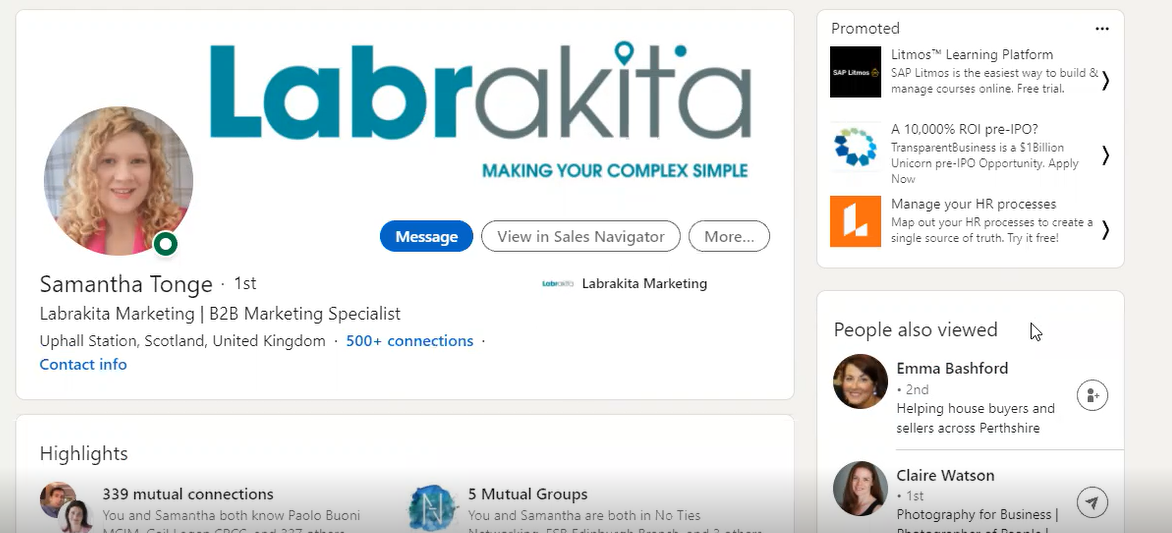
So, you've immediately exposed yourself in a very, very, short time and you've got to get somebody's attention to them jumping on a competitor for example. So that's a couple of reasons why we always recommend that you switch "peaple also viewed" to "no". So that would be that would be the first thing.
The second thing would be, if you don't mind, I'll stay on your example, second and third-degree connections are privy to looking at your contact info. So, after this call maybe you'll go off and pop another website in there, who knows, you might want to pop some reference to your, the region that you cover, or your location because SEO again, if I was to Google, your expertise, I would probably ask for a B2B marketing expert in the Edinburgh area. So it's important to go geo tags or our geography reference in there.
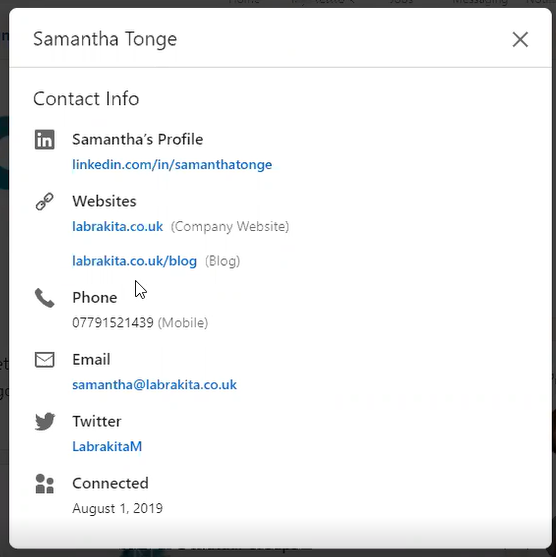
But the other mistake that people make is that, if I'm looking at your profile for the first time. I have a look at your "about" and I'm quite impressed, have a look at your experience. At that point I may not want to connect with you right away, I might want to give you a call, or I might want to drop you an email, rather than rather than connect. So, for anybody who's not forced to be a connection, they won't see your contact information.
Samantha: Ah, okay, so you have to be a first-degree connection to see that?
Steve: They're kind of forced to connect with you in order to learn more about you. If you've got your email, if we just go back to me, if you've got your email featured in your about section, and your experience.
As I have down here at the bottom, if somebody doesn't want to necessarily connect with me right at that point. They've at least got my telephone number, they can take a look at the website or they can email me. So, that would be the second tip I would give to anybody who's updating their profile, to put their contact information into their about section and their "experience" because you don't know if a client is going to jump immediately onto your about section or immediately onto your experience section so you've given them the option to do both. And because LinkedIn is open source, if you wanted to jump on my profile and just cut paste. And then adapt and put that in your about section, you know, your perfectly at liberty to do that. So that would be top tip number two.
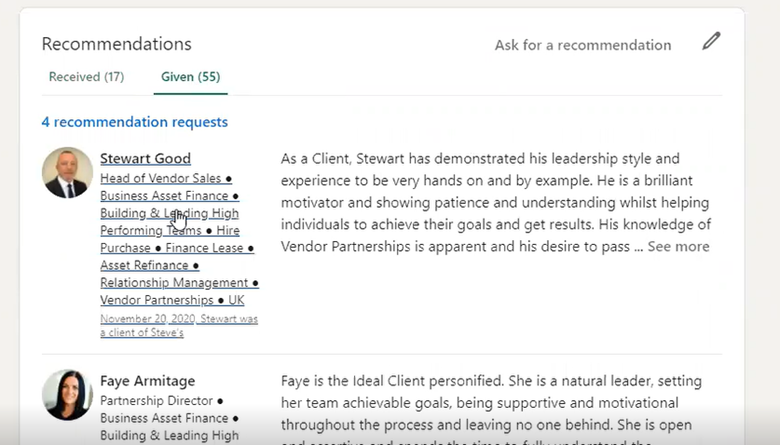
This might be an interesting one for you. My third recommendation or top tip would be to give recommendations. Lots of people think that it's, it's important only to receive recommendations because those are kind of direct referrals but the point about giving recommendations, is that when you give a recommendation, my profile pops up on Stuart's. So, Stuart's a client of ours, unless Stewart has had others recommend him since I did which I guess he has or he's not accepted my recommendation yet. Let's choose a different one. Try Faye perhaps. Then my profile will be sat on the recommended person's profile. That makes sense?
Samantha: Yes.
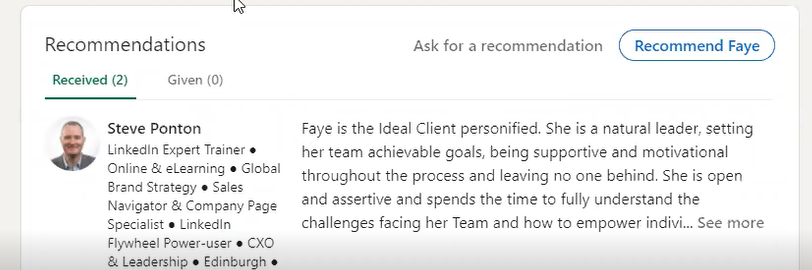
Steve: So, if we go to Faye, who I'm pretty sure has. Yeah, so anybody who visits Faye’s profile and scrolls all the way down will see that I've given Faye a recommendation, and talked about how we've worked together with Faye as a client and what we've done for the business. It gives you another opportunity in terms of promoting your brand, essentially on other people's profiles. Now, once Faye gets another couple of recommendations, I will slip down the recommendation list if you like, but you can adjust that as well, you can move your recommendations around so that the most relevant ones are kind of at the top of the top the bio if that make some sense. So, anybody who feels that it's all about receiving recommendations, then it's quite important to give recommendations as well because it allows your profile to be featured on other people's profiles.
Samantha: And it sounds like you're suggesting not just giving recommendations to suppliers, but your clients as well?
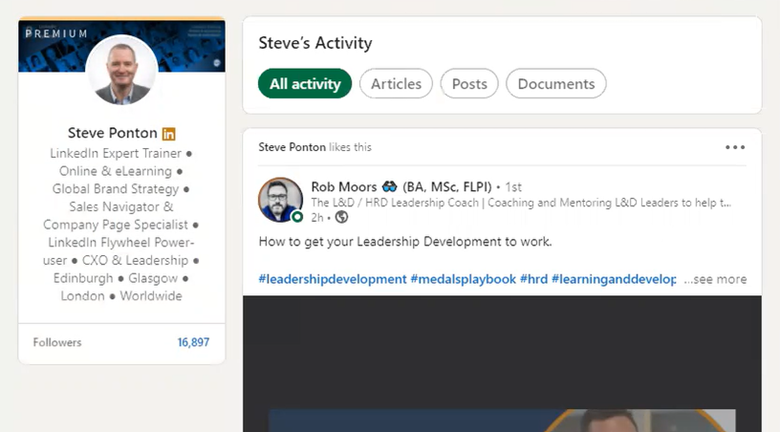
Steve: Yeah, LinkedIn is based on various degrees of connectivity. So really what you're looking for and what we teach in our training is to be connected to clients, suppliers, customers. Just really sort of think out the box in terms of expanding your network. Because every time you know there's something in your feed regarding that person, it's an opportunity for you to expand your network. So, if we look at for example, some of the content I've commented on today. See if I go to "all activity", so Rob Moors who's a guy that I recently started to follow, I find his content really, really, interesting. He's popped up a post there today so I've, I've popped a like for that particular post. I can go back to it later on today and add a comment.
Adam Gray has put in some tips today, another person that I follow, And then because there's a conversation going on I've liked a few of the comments that have been made there. I immediately appear on Kevin's radar if you like, and Kevin may be interested to learn more about what I do to help clients etc. etc.
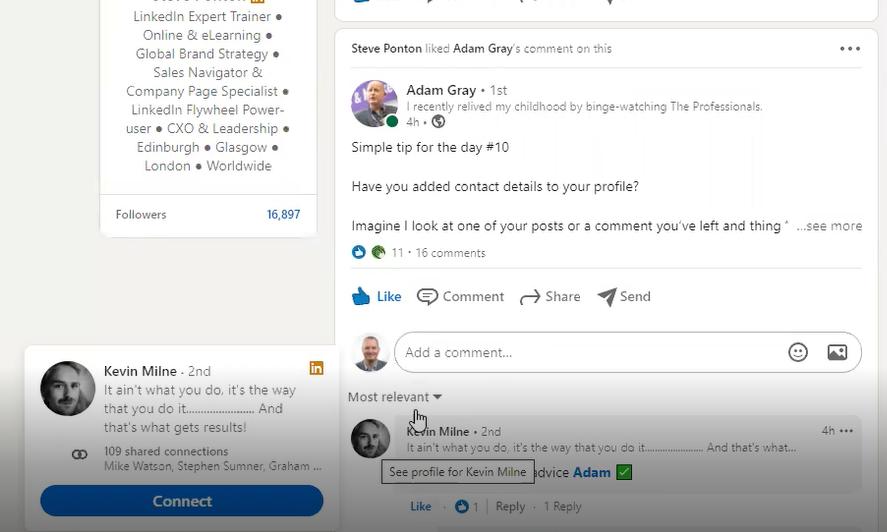
So, it's all about participating and being engaged with prospects, clients, suppliers across the board. The more people you can be engaged with, the better you are the more effective your time's going to be on LinkedIn.
Samantha: And with regard to that with LinkedIn's current algorithm algorithms I think I'm correct in saying it's "liking" and "comments", are much more valuable than shares, is that correct?
Steve: That's one train of thought at the moment. I think the problem with people trying to second guess the algorithm is that, what you hear today might be something completely different tomorrow. You're not going to change the way that you operate, just because somebody you know mentioned that the algorithm is now going to favour one, you know one type of content or one type of activity or the other. And I think as I said earlier that we try and avoid getting involved in the algorithm conversation because it's something that we can't really do much.
Samantha: Just monitor what's, what's performing at any one time I guess is a general thing?
Steve: Yeah, I guess that's kind of the sort of thing that you would recommend your clients do anyway, if you can analyse what you're doing, rather than trying to second guess what might be happening, I think that's probably a better way to spend that time, rather than getting stressed about am I putting enough, you know, videos out there, am I am I sharing enough.
And if your general habit and methodology is to "like", "share" and "comment", (just clicking a like is very, very easy. You know that's not really engaging, that's being lazy and just kind of putting something out there, hoping that that might get in some kind of traction or might get you some kind of attention. And it's all about being genuinely being engaged, and making comments that are relevant, all the time so just get into the habit of being active "liking", "sharing", "commenting". But whatever the algorithm, it will take care of itself.
And, and I think that kind of leads me to suggest that just be yourself. Bring your personality to LinkedIn. It is a big mistake that some people make but it's very, very difficult for some people to overcome. This is your digital persona, this is what people will see even though you're not there 24 seven. So, you really need to make sure that the first impression is lasting, and that you try and project, your personality, through your profile. I know for a fact because we've met a number of times before COVID, and we know each other pretty well, that you've got a thing for 40s and 50s gear. I would love to see that come through in your profile, because that's part of your personality.
Samantha: Yes, it's really difficult isn't it? I've realised that at the moment part of my brand in the real world is very much, as you say, the 40s and 50s style clothing. But now it's all Zoom at the moment it’s the curly hair, so I had to change my profile picture to make sure it's one where my hair wasn't straightened (I rarely do that).
Steve: Yeah, there's nothing to prevent you from mentioning in your, in your "about" for example, that you've got a penchant for 40s and 50s gear and where the background to that came from. For me, I think it's pretty important that you get your personality through. And I like to think that if I connect with somebody on LinkedIn, then we met at a networking event or on a Zoom call, that I come across as the person they hoped I was going to be through my profile. So that's a challenge right now I think for people. I think people would do much better on LinkedIn if their personalities can be shown in the profiles so we're kind of working on how we're going to get there, how we're going to achieve that for our clients to really get their personality across. And, you know, it's a business platform but it's okay to have a bit of a joke on there, it's okay to be playful on LinkedIn, it doesn't always have to be boring stuffy business stuff. But it's not Facebook, and it's not.
Samantha: Yeah, no one wants to see pictures of your dinner.
Steve: No, no, absolutely not. But you can still be playful as long as the message is there. So, I hope that helps. That gives some people insight.
Samantha: Yeah, definitely. I think there's a lot of a lot of crossover. Some things you're saying about the profile are exactly the same things I'm telling clients about when they're writing for their website, when they're thinking about their brochures, their advertising etc. So, it's interesting to hear that those same messages. As you say, it's all about what you achieve for the customer. It's about the customer, then what you can do for them.
Steve: Absolutely.
Samantha: That's fantastic I'm definitely going to re-watch this and take copious notes.
Steve: Just drop me a line. I mean, if you look on my profile, the green dot will always be a full green dot. I'm probably obsessed with LinkedIn if I'm completely honest. For the people that are watching this, it's my, it's my messenger, it's my calendar, it's my prospecting tool, it's my database, it's my... There are so many things that you can do all on the free version. But whenever you see the green dot full, drop me a message, send me a voice message.
One other tip I would give to record your name. You can record the pronunciation of your name on the mobile app, and then it appears on the on the on the computer app as well so if somebody has got a bit of a problem, understanding exactly how to pronounce your name, then your voice is telling them exactly and it's a 10 second sound bite. I think my message is something like, “Hi, Steve Ponton, I'm here to help with your LinkedIn training. So you get an opportunity again to market yourself a bit more.
So, lots and lots of features on LinkedIn that you need to understand how they're going to benefit you and some stuff you'll just never use, but other stuff is very, very powerful in terms of getting your message and your brand out there.
Samantha: Yeah, it sounds like there are lots of little tricks, probably most of us are missing.
Steve: Yeah, but in saying that, I don't want you to think of us as a sort of tips and tricks company. We have a tried and tested methodology that hundreds of people are using. It starts with clarifying your brand, it then goes on to an optimised profile. There's no point putting out fantastic content, or messages, or sharing, or whatever. If your viewer then comes back to a vacant profile with no further information, an inappropriate profile photograph and inappropriate I mean, you know, downing ten pints of lager in a bar in Ibiza, or sticking a flag in the top of Mount Everest, or, or you've cut off your partner in a wedding photograph and you've got a big flower arrangement on your, on your lapel. You wouldn't turn up to a business meeting looking like any of those. So, you know, think a wee bit about what people might think of you when they first see you, see on LinkedIn for sure. It's your digital persona and it has to be your best shot at it.
Samantha: Yeah. And it's all about building relationships. Certainly, from a business development point of view, it's building those relationships with connections.
Steve: I truly feel, and I've found throughout the COVID situation, that people are okay with digital to begin with, but people are actually starting to have more insightful conversations, albeit, you know, "Hi I'm Steve. How are you getting on during this, how's your business been affected" people are also realising again that conversations can be had. There's a train of thought you shouldn’t send a message that says, "Can we meet up for lunch or coffee" etc. but some people are quite happy to do that. Some people make the immediate connection if your profile has been put together correctly, and they are quite open and come to you to say "why don't we have a chat", they know that they may be a potential client, rather than the other way around. But I think people are really just yearning for more insightful meaningful conversations.
Samantha: Thank you so much for that Steve! So, before we go, have you got anything to plug?
Steve: Yes, we have. Miles and I have been working very hard over the close-down period. We appreciate that lots of people are new to LinkedIn. We appreciate that lots of companies have had to furlough their staff. The good thing about furlough (if there is a good thing) is that training can still continue.
So, if you are furloughed but not allowed to do any kind of proper work for your business you still allowed to train. So we've taken our training methodology, as a fully funded course from Skills Development Scotland if you're eligible. If you go to "my world of work", key in "sales and business development in the digital era", you will get access to the information that tells you if you're eligible get our LinkedIn course fully funded. Alternatively, you can contact me directly. You'll find me on LinkedIn. My email address is steve@linkedinsuccesssystems.co.uk.
We will also carry on doing our free sessions online. We've got a webinar on the 18th of February, that everybody is welcome to come along to. We've had 200 people in the last two webinars. There's no selling in the webinars, it's all about helping people to understand how they can use LinkedIn more effectively to help their businesses. So we've got that coming up on the 18th.
And as I said, Samantha earlier, my green dot is always lit. Drop me a message, I'll always respond. You can ask me questions on features, LinkedIn, how to change x y and z how to improve your profile picture, how to get rid of unwanted people connecting with you, etc. I think this is a time where everybody really has to help each other out. We've been blessed I suppose in that LinkedIn is a platform that lots of people have turned to, to find jobs to help with, with a CV, to continue the business development and sales activities. Regardless of what you think you might use it for, get in touch, and we'll be happy to help.
Samantha: Brilliant. Thank you very much! And thank you for everyone viewing this!
Steve: What's, what's the dog's name?
Samantha: The dog's name is Ty. He was a Tyson, when we adopted him, we thought it was a terrible name for a dog, so we just dropped the "son", he's just Ty now.
Steve: Ty, That's brilliant Right, well thanks for joining us Ty. He looks completely bored. I don't think he's the target audience for LinkedIn at all is he?
Samantha: Definitely not.
Steve: Well, thanks Ty. And thank you Samantha for inviting me on.
Samantha: No, thank you!
If you need any help with LinkedIn marketing communications, call me on 07791 521439 or email me at samantha@labrakita.co.uk
For help with using LinkedIn as a business development tool, contact Steve on his LinkedIn profile or email him at steve@linkedinsuccesssystems.co.uk.